The year was 2022, and Apple introduced a new architecture for Apple Home in iOS 16.2.
If you upgraded during the beta period, life was hard. Some had no problems at all, but for those that did, it was very frustrating.
Devices disappeared, video feeds were broken, slow response times for automations, and other random problems. Apple even paused the update before re-releasing it again in iOS 16.4.
After the bumpy start the roll-out went pretty smooth. I upgraded mine with out issue, as did several people I know.
Fast forward to February 2026…
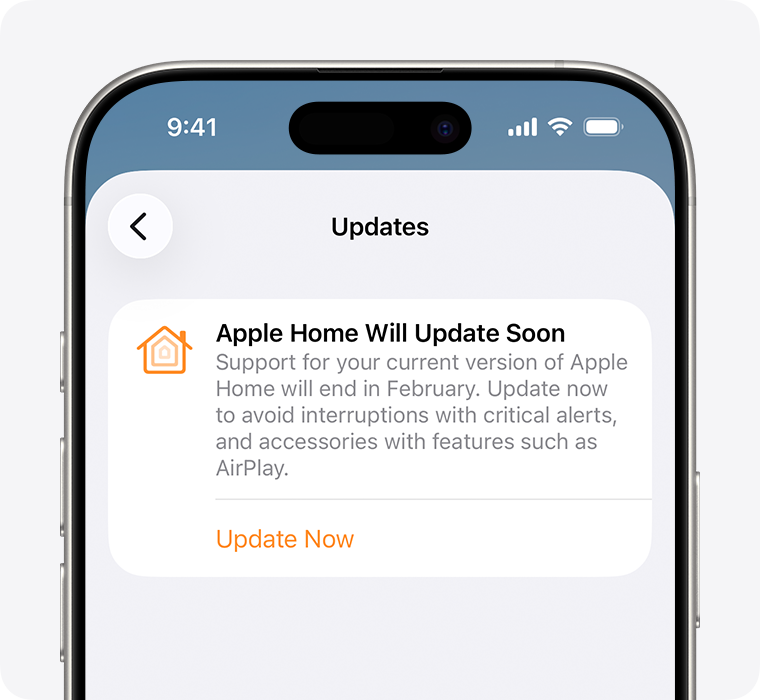
Apple is requiring everyone to upgrade to the “new” architecture. They warn that you should update to avoid interruptions with critical alerts, and accessories with features such as AirPlay.
How to update
Open the Home app on iPhone or iPad.
Touch the More button.
Touch Home Settings.
Select Software Update.
Touch Update Now, if you haven’t upgraded yet.
Image from support.apple.com
The upgrade will take anywhere from a few minutes, up to 30.
If you’ve waited till the last moment, now is the time to upgrade.
Did you have any problems when you upgraded? Please let me know!